
The Dell PowerVault MD3200i is an iSCSI SAN device. It comes with two raid controller each with it’s own management network interface, located on the back of the unit.
Generally speaking, most management of the unit is done through the “Dell Modular Disk Storage Manager” application. Problems can arise if you’ve purchased the Dell PowerVault MD3200i used / from someone else and have no idea what the IP and or username / password is.
Please see below for the steps to reset the Dell PowerVault MD3200i to factory default settings.
You will need the serial management cable. This cable has a connector that resembles a PS2 plug on the one side and RS232 COM port on the other and can be purchased directly from Dell or through eBay.
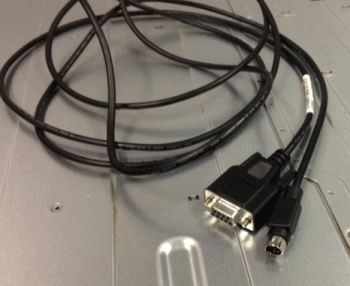
Plug this into your PC or laptop and make sure its connected to “controller 0” on the Dell PowerVault MD3200i (The top one)
When the lead is connected, use Putty to establish a serial connection. You will need to set the baud rate to 115200 ( see details below )
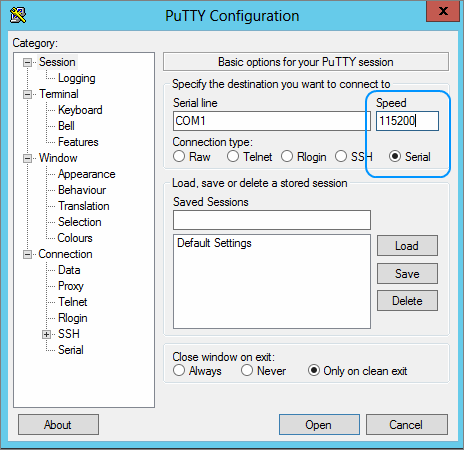
To get into the service menu you need to press the following keys in the Putty Terminal Windows:
<Ctrl> & Pause / Break
Then type CAPITAL S for Service Interface followed by the enter key.
The default password here is “supportDell” – case sensitive.
From here you can:
- Display the Current IP configuration
- Change the Current IP configuration
- Reset Storage Array Administrator Password
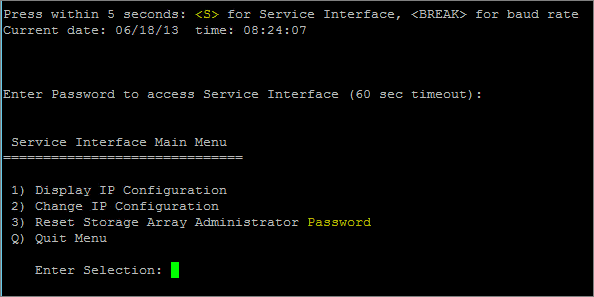
It is a pretty straight forward text based menu procedure to complete any of the steps above. Please note that you will have to reboot the Dell PowerVault MD3200i for any of the above steps to take affect.
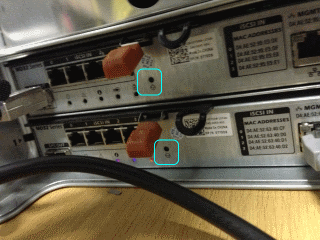
Alternatively, if you have the IP addresses already or they are still on their default IP address 192.168.128.101, you can reset the password by pressing and holding for 5 seconds the “password reset button” which is located on the rear of the Dell PowerVault MD3200i, right beside the controllers.
Still having issues resetting or accessing your Dell PowerVault MD3200i? Contact us via @planitcomputing or via telephone on 014852222 for assistance.
ONE THOUGHT ON “PASSWORD RESET DELL POWERVAULT MD3200I”